New server, new me, 100x pipeline speedup
Finally, I also moved my server to a consoomer Linux, though this time it is Debian and not Linux Mint. 1 In fact, I just got a new server, as I could get more RAM for less money, as weird as this might sound nowadays.
Basic setup #
I created a quick role with ansible-galaxy role init server in which I
basically only use the files/ and tasks/ directory, as well as the
README.md, as I have gotten both very good, but also annoyingly pedantic
about documenting absolutely everything.
Pretty much 90% of the role is this tasks file:
---
# tasks file for server

- name: Update apt cache
  ansible.builtin.apt:
    update_cache: yes
  tags:
    - base

- name: Install base programs used for administration
  ansible.builtin.apt:
    name:
      - curl
      - htop
      - traceroute
      - telnet
      - python-is-python3
      - python-dev-is-python3
      - screen
      - ncurses-term
      - vim-nox
      - rsync
      - xfsprogs
      - net-tools
    state: present
  tags:
    - base

- name: Copy sshd_config to target
  ansible.builtin.copy:
    src: sshd_config
    dest: /etc/ssh/sshd_config
    backup: yes
    owner: root
    group: root
    mode: '0640'
  notify: Restart sshd
  tags:
    - base

- name: Copy nftables to target
  ansible.builtin.copy:
    src: nftables.conf
    dest: /etc/nftables.conf
    backup: yes
    owner: root
    group: root
    mode: '0755'
  notify: Configure firewall
  tags:
    - base
The ssh config is pretty standard stuff, and the firewall also simply makes sure that nothing goes in and out that’s not ssh or web traffic.
Of course, a server needs to serve things, but I do not have time anymore to deal with manual deployments, or even Ansible for that matter. While I did manage well to avoid the obligatory rant about docker and most setups, this now means that I can not link to that rant. The closest thing I could find is me recommending against the docker spaghetti deployments.
Anyway, the base setup is as follows:
- k0s to quickly deploy a single node cluster
running
k0s install controller --enable-worker --no-taints - run NGINX Gateway Fabric (NGF)
and expose the gateway via
hostPorton the host; this was a tad more tedious than setting up an ingress the old way, as the NGF is essentially an operator deploying gateway NGINXes - run cert-manager with a Let’s encrypt cluster issuer
And that’s basically it. One more note on the Gateway, while it is evident why things are done this way now, it is a bit more cumbersome than previously with ingresses. For the served pages I now need effectively four (and one managed) resources:
- in application namespace: a
HTTPRoute, being basically what the old Ingress resource was - in application namespace: a
Certificateas well as theSecretmanaged by it - in application namespace: a
ReferenceGrantto allow the NGINX gateway to access theSecret - in NGINX gateway namespace: the
Gateway, referencing the Secret for TLS termination
The latter could be prevented by using wildcard certificates, but this also means that now the cluster admin (me) can prevent stupid tenants (also me) from accidentally exposing hosts to the internet.
Workloads #
The workload then is managed simply by k8s manifests.
It is a single node deployment, so they were quick to write and I use
hostPath for everything that needs to be persisted.
The two interesting workloads are basically this blog and forgejo.
The blog is a static page. In the past I used Pelican, but since then I kind of started enjoying Hugo. Partially because it has a more common Markdown flavor and partially because I am nowadays just more used to go templates than jinja templates.
As theme I slightly modified nojs, because it does not do blogs as I like it and it did not have an RSS feed. One of the things that broke of course is the RSS url which now has a new link. Since I actually considered just dropping most, if not all of the old content, I still take that as a W.
I have yet to include the KaTeX rendering, because this needs a bit more
setup as to not serve external resources.
Otherwise, well, I think it looks definitely better than my previous blog.
There might be still some conversion issues here and there, but it should be
mostly fine.
Conversion used pandoc + generous amounts of sed, but was mostly
uneventful.
Interestingly, translating the pelican flavored .md to Hugo flavored .md
took more work and scripting than translating my older .rst files.
Building the pages now was a bit more hassle than before. On my old machine I had gitolite or even its predecessor and git hooks, which then build the webpage with a system wide install of pelican.
Runner setup #
With forgejo in place the time was ripe that I could do it the proper way, namely with runners. Sadly, the existing forgejo runner is not made for kubernetes and essentially expects a docker socket, a design decision I clearly have to disagree with. Writing your own workload orchestrator that then talks to a docker socket to spawn all sorts of container is in general a bad idea (looking at you, Nextcloud AIO), especially if you have only very limited development resources.
Apparently the runner is a fork of another runner, which in the past actually
had native support for running jobs in proper kubernetes Jobs, but well, we
cannot have nice things.
Luckily, while runners feel like magic, they are just processes which
- have some authentication token
- periodically ask the forge’s (does not really matter if it is a Gitlab, forgejo, gitea, github or whatever) runner API if there is a job
- then run the job, according to the API specs
- and tell the forge whatever is happening so it can display things nicely in the web interface
Using fancy auto-completion it was easier to create a runner than to actually
find usable API documentation. Well.
Now this runner runs as a deployment with the same user as the NGINX
serving my blog, mounting the output directory (as well as an emptyDir
mounted to /tmp for it to work).
The image is also hosted in the forgejo instance, which made things easy for
me.
It only contains python (because that’s what the runner is written in), bash
(because the runner scripts generated by forgejo use Bashisms), git (to do Git
things) and of course hugo.
To be honest, at first I was disappointed that I did not have a generalized solution (yet). But I actually like this setup in some way. By having the runner in a very restricted container, I get strong control about whatever tenants can do, as the workflow file ultimately is just an interface for remote code execution. On the other hand, because I have more control about what can be executed, I can grant more privileges on the deploy side. 2
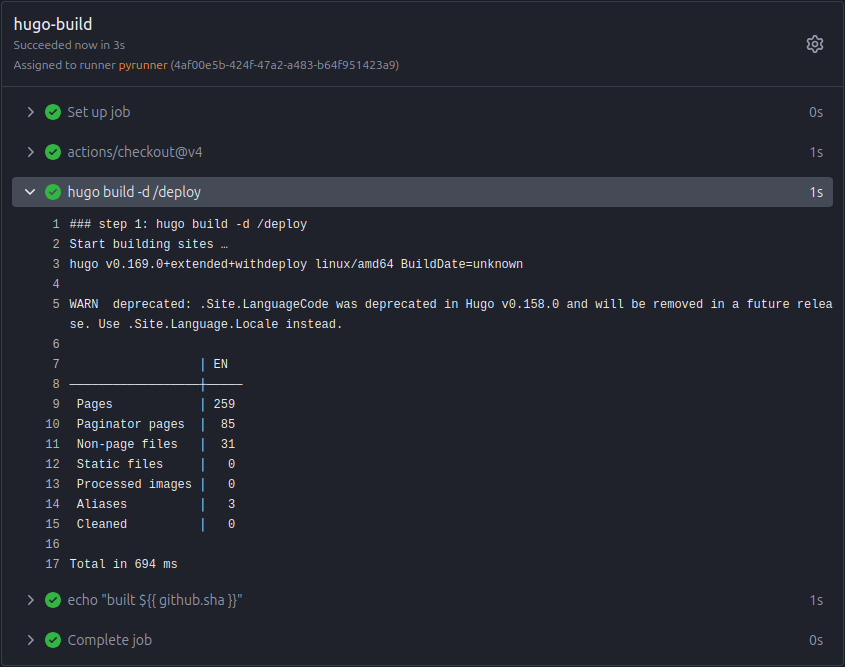
Building with Hugo is fast. Pelican alone took tens of seconds.
Runner performance #
One of the things that really stands out is how fast pipelines can be. The whole pipeline is done in three seconds. Now, I unironically love running pipelines in production. The feeling of power, when a single commit triggers the spawn of a virtual machine, which then downloads a container, to run your two second script, only to be send back into oblivion the instant it finishes. But well, that can take minutes, while this runner takes seconds. Cue Adam Drake.
Speed aside, by moving away from the all-purpose runner, I can probably get around some problems which I had not yet solved in some other project. There we have hundreds of repositories, which are pushed in real time in a live system, and each repository has a specific set of developers. Allowing them to define the workflow would wreak chaos, but there are no good and established version control systems that have access control on subdirectories or files. Currently this runs with magical Git hooks, but those are completely oblique to the developers, maintainers, and to be honest, most of the admins. Though this is a problem for some long weekend with a couple of beers and wizards knowledgeable in the arcane magic of this piece of history.
Overall I am quite happy with the whole setup.
Of course, some people might think of it as overengineered, but typically
those also are already quite challenged by managing something like a few
fleets of webservers and struggle with Git.
I can now see everything in one place (kubectl get pods -A), have all my
configuration under version control and failing builds are much easier to
reproduce, notice and debug; with git hooks I always had to push some bogus
commit to see the output again.
-
I try not to rant too much about binary distributions, but it took many glorified autocompletion tokens to find out that Debian’s mutt is built with
gpgmewhich then interferes with S/MIME. Another problem that could have been avoided by just building things with use flags. ↩︎ -
In bigger production environments, where the forge and runner are shared across teams, it is criminally negligent to allow runners any access to your cluster. ↩︎